Flutter vs
React Native
Which one should you build with?
We have shipped production mobile applications on both Flutter and React Native for clients in the USA, UK, and Australia. Both are legitimate frameworks used by serious companies. The right choice depends on your team's existing skills, your UI requirements, your performance targets, and whether you want to share code across mobile and web. This comparison covers the factors that actually matter when you are making that decision.
Flutter
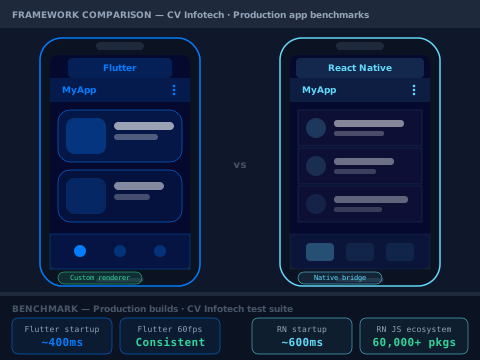
Best for: pixel-perfect custom UI, no web team, performance-critical apps
React Native
Best for: existing JavaScript/React team, web + mobile code sharing, faster ecosystem
The short answer, before the details
Both Flutter and React Native are production-ready, actively maintained frameworks with large communities. Neither is a bad choice. The difference is in who they suit.
Choose Flutter if:
- Your team does not already know JavaScript or React, and starting with Dart is not a disadvantage
- Your app requires a highly customised, pixel-perfect UI that does not look like a stock iOS or Android app, Flutter's custom rendering engine gives you complete visual control
- You want consistent visual output across iOS and Android without platform-specific UI divergence
- You are considering web and desktop targets in addition to mobile, Flutter's multi-platform story is stronger
- Performance in animation-heavy or graphics-intensive applications is a priority
When Flutter becomes the wrong choice:
- — Your team is already proficient in React and JavaScript, the context switch to Dart adds real ramp-up time
- — You need deep integration with native iOS and Android APIs that are not yet covered by Flutter's plugin ecosystem, some less common native capabilities require writing platform channels
- — You need to share business logic with a React web application, React Native's JavaScript bridge makes that sharing more natural
Choose React Native if:
- Your team already knows React and JavaScript, the learning curve is dramatically shorter and you can often move developers between web and mobile work
- You want to share significant business logic, API integration code, and type definitions between a web React application and your mobile app
- You prefer native UI components, React Native renders genuine iOS and Android controls, which means your app automatically behaves the way users of each platform expect
- Your project depends on a specific npm package that has no Flutter equivalent, the JavaScript ecosystem is significantly larger
- You are building an enterprise app where the native look and feel on each platform matters to users
When React Native becomes the wrong choice:
- — You need complex custom animations or a fully bespoke visual design that departs significantly from platform conventions, Flutter's rendering engine gives more control here
- — Your team has no JavaScript experience and you are starting from scratch, the Dart learning curve is no steeper and Flutter's tooling is excellent
- — You are targeting desktop or web as well as mobile in the same codebase, Flutter's multi-platform support is more mature
Flutter vs React Native, what actually matters
The benchmark numbers you read online are usually synthetic. Here is what the real differences look like when you are building and shipping a production application.
1. Performance
Flutter has a genuine performance advantage in specific scenarios. It uses its own rendering engine (Impeller, replacing the older Skia engine from Flutter 3.10 onwards) that draws every pixel directly, it does not rely on native UI components or a JavaScript bridge. This means animations, transitions, and complex UI interactions are consistently smooth at 60fps (and 120fps on supported devices) because there is no bridge to cross and no platform component to negotiate with.
React Native has historically had a JavaScript bridge overhead, the JavaScript thread had to communicate with the native thread for every UI update. The New Architecture (Fabric for the UI layer, TurboModules for native modules) removes this bridge using JSI (JavaScript Interface), which allows synchronous communication between JavaScript and native code. React Native apps built on the New Architecture are significantly faster than older React Native apps. The performance gap between the two frameworks has narrowed considerably since 2023.
In practice: for apps with complex custom animations, game-like interfaces, or heavy graphics work, Flutter still holds a meaningful performance advantage. For standard business apps, lists, forms, navigation, API-driven content, both frameworks perform well enough that the difference is not noticeable to end users.
Mini verdict: Flutter wins on raw rendering performance for complex UI. React Native's New Architecture closes the gap for standard business apps.
2. UI fidelity and design consistency
This is where Flutter and React Native make fundamentally different bets. Flutter renders everything with its own engine, a Flutter button looks the same on iOS and Android because it is drawn by Flutter, not by the platform. This is a feature if you want a consistent brand experience across platforms. It is a limitation if you want your app to feel native to each platform.
React Native renders native components. An iOS switch looks and behaves like an iOS switch. An Android text field looks like an Android text field. Users on each platform get an experience that matches their platform expectations without you having to implement platform-specific code. The trade-off is that achieving a highly custom design requires overriding or replacing native components, which can be more work than it sounds.
The practical implication: if your designer hands you a mockup that looks identical on iOS and Android, Flutter is easier to implement. If your app should feel native to each platform and follow each platform's design language, React Native's approach is closer to that goal by default.
Mini verdict: Flutter wins for consistent cross-platform brand design. React Native wins for native platform look and feel.
3. Developer experience and learning curve
React Native's learning curve is close to zero if you already know React. Components, hooks, state management, JSX, styling with StyleSheet, if you have built a React web application, you understand the mental model. The tooling (Metro bundler, Expo, React DevTools) is familiar. You can often move a developer who works primarily on your React web app onto a React Native project with minimal ramp-up.
Flutter requires Dart, which is a different language. Dart is well-designed and not difficult to learn, developers typically become productive in Dart within a few weeks. But it is a genuine context switch. Flutter's tooling (flutter CLI, hot reload, widget inspector) is excellent, arguably better than React Native's equivalent tools. The Flutter documentation is among the best in the mobile development ecosystem.
For a team starting from scratch with no existing JavaScript or React experience, the learning curve difference is minimal. For a team with strong React experience, React Native has a clear productivity advantage at the start of a project.
Mini verdict: React Native wins for teams with existing React experience. For new teams, the difference is small.
4. Ecosystem and packages
React Native has access to the entire npm ecosystem, over 2 million packages. Not all of them are relevant to mobile development, and not all npm packages work in React Native without modification, but the breadth is significant. For most requirements, a well-maintained package exists. The React Native community is large and active, with strong contributions from Microsoft (React Native for Windows and macOS), Shopify (several widely-used packages), and Meta.
Flutter's pub.dev package ecosystem is smaller but growing rapidly. For common mobile requirements, HTTP clients, state management, image handling, maps, camera access, local storage, well-maintained packages exist. For less common native capabilities, you may need to write a platform channel (a bridge between Dart and platform-native code). The Flutter team at Google is active, and the framework is a stated priority.
One area where Flutter's ecosystem lags: web-focused packages and packages that wrap web APIs. This is expected, Flutter's web support is newer and the community has had less time to develop web-centric packages.
Mini verdict: React Native wins on ecosystem breadth. Flutter's ecosystem covers the majority of production use cases well.
5. Code sharing and multi-platform
Both frameworks target iOS and Android from a single codebase, this is their shared premise. The difference is in how far that sharing extends.
Flutter supports iOS, Android, web, macOS, Windows, and Linux from a single codebase. The web and desktop support has matured significantly since Flutter 3. If you are building a product that genuinely needs to run across all of these targets, Flutter's approach is coherent and the tooling supports all targets from a single project.
React Native targets iOS and Android natively. For web, you use React Native Web, which is a separate project that maps React Native components to DOM equivalents. It works, and several large applications use it (Twitter's mobile web app was built on React Native Web), but it is not as integrated as Flutter's web support. For desktop, React Native for Windows and macOS exist as Microsoft-maintained projects.
If your codebase is sharing logic with a React web application, React Native is the more natural choice, same language, same patterns, shared business logic and type definitions are straightforward. If you are targeting mobile, web, and desktop from a single codebase with no existing web React application, Flutter's multi-platform story is more cohesive.
Mini verdict: Flutter wins for true multi-platform (mobile + web + desktop). React Native wins for sharing logic with a React web app.
6. Hiring and long-term maintainability
React Native developers are drawn from the JavaScript and React ecosystem, the largest pool of web developers in the world. Finding a competent React developer who can transition to React Native is realistic. Hiring a dedicated React Native developer is competitive because the role requirements are well understood in the market.
Flutter developers require Dart experience, which is a smaller pool. As Flutter has grown, it is now consistently among the top frameworks in developer surveys, the pool of experienced Flutter developers has grown correspondingly. But it is still smaller than the React Native talent pool, and in some markets, hiring Flutter-experienced developers takes longer.
For long-term maintainability: both frameworks are actively developed by major companies (Google for Flutter, Meta for React Native) and have large open source communities. Neither is at significant risk of abandonment. Flutter is a stated strategic priority for Google. React Native's New Architecture has brought renewed investment from Meta.
Mini verdict: React Native wins on hiring pool size. Flutter's pool is adequate for most markets and growing.
We build on both, and the choice depends on your project, not our preference
CV Infotech has shipped Flutter applications and React Native applications. We have Vakmangids, a long-running platform maintained since 2019, and UltimaBot and UltimaWriter, AI-powered platforms built with React. Our mobile team has used both frameworks in production.
When a client asks which framework to choose, we ask five questions: Does your team already know React? Do you need to share code with an existing web application? How custom is your UI? Are you targeting web or desktop in addition to mobile? What does your hiring plan look like for maintaining the app after launch?
Those five questions almost always produce a clear answer. We have never recommended Flutter to a team with deep React experience who also maintains a React web application. We have never recommended React Native to a team building a gaming-adjacent app with complex custom animations. The frameworks suit different situations.
USA (CCPA, AWS us-east-1, EST)
US clients building on React Native benefit from the large US-based React Native talent pool for in-house maintenance after delivery. CCPA compliance in mobile apps involves data collection disclosures in the App Store listing, in-app privacy policies, and correct implementation of opt-out flows, we implement these on both Flutter and React Native builds. iOS App Store and Google Play submission handled by our team.
UK (UK GDPR, AWS eu-west-2 London, GMT)
UK GDPR applies to mobile apps at the data collection layer, consent flows, privacy policies, and data subject rights must be implemented correctly. We configure this on both frameworks. UK App Store submissions follow Apple's regional review guidelines, which we handle as part of delivery. GMT-compatible standup schedule for UK-based clients.
Australia (Privacy Act 1988, AWS ap-southeast-2 Sydney, AEST)
Australian Privacy Act requirements for mobile apps cover data collection transparency, storage, and user rights. We implement compliant privacy flows on both Flutter and React Native. App Store and Google Play Australia submissions included in delivery scope. AEST morning aligns with IST afternoon for daily progress updates.
Flutter development
Custom UI, complex animations, multi-platform targets. Dart proficiency across the team. Delivered on iOS and Android. App Store and Play Store submission included.
React Native development
JavaScript and React expertise applied to mobile. New Architecture (Fabric + TurboModules) on all new projects. Expo-managed or bare workflow depending on requirements.
Framework migration
We migrate React Native apps to Flutter and Flutter apps to React Native when the original framework choice no longer fits the project's direction. Full assessment before any migration recommendation.
App Store and Play Store delivery
We handle the full submission process, certificates, provisioning profiles, store listings, screenshots, age ratings, and review responses. Delivery means live in both stores, not just a build file.
How we build your app
A straightforward, fixed-price process, whether you choose Flutter, React Native, or something else entirely.
Framework recommendation and technical scoping
1–2 hoursA free call where we discuss your project, your team's existing skills, your UI requirements, and your long-term maintenance plan. We give you a framework recommendation with reasoning at the end of the call. We then scope the build: screen count, API integrations, authentication model, third-party services, and any custom native functionality.
Fixed-price proposal
24–48 hoursA proposal with a fixed total price, milestone breakdown, and delivery timeline. Milestones are tied to functional deliverables, a working authentication flow, a completed product listing screen, a finished checkout, not arbitrary percentages. The price does not change unless you add scope.
Build, review, and iterate
6–20 weeksWe develop in 2-week sprints. At the end of each sprint, you receive a TestFlight build (iOS) and an APK or Play Store internal test build (Android), real builds you can install on your device and test, not screen recordings or demos. Every sprint review includes a walkthrough of what was built and what is next.
Launch and handover
1–2 weeksWe submit to the App Store and Google Play, handle review responses if Apple or Google requests changes, and launch to production. Full source code is transferred. We provide documentation covering the project architecture, third-party services, environment configuration, and how to build and submit future updates. 30 days of post-launch support for genuine bugs.
Flutter vs React Native, Frequently Asked Questions
Ready to build your mobile app?
Tell us what you are building, what platforms you need, and whether you have an existing web application we should consider sharing code with. We will give you a framework recommendation and a fixed-price proposal, no open-ended estimates.