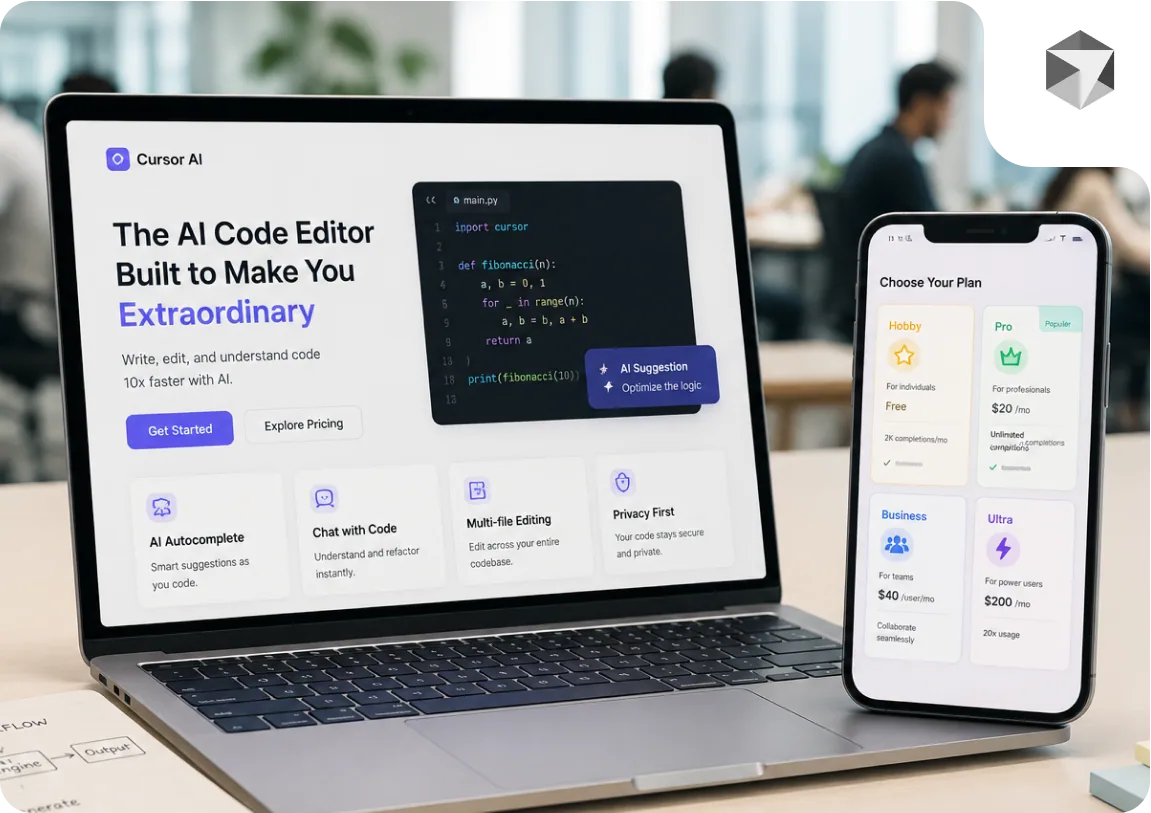
cursor.com's $20/month Pro plan ran out of credits in 2 hours for thousands of developers in June 2025. The CEO apologized. The billing model changed. Ultra is now $200/month. Here is the complete breakdown, every plan, what each one actually delivers, and when AI tools alone are not enough.
The Four Cursor AI Pricing Plans in 2026
Cursor offers four plans. The jump from free to Ultra is a 13x price increase. Whether that jump is justified depends entirely on how you use the tool. Here is what each tier actually gives you.
Hobby, Free
- Price:
- $0
- Completions:
- Limited (exact quota changes periodically)
- Models:
- Slower model access only
- Best for:
- Evaluation, occasional use, students
The free tier gives you enough to evaluate whether Cursor fits your workflow. Completions reset monthly. You will hit the limit quickly if you use AI assistance throughout the day. The models available on Hobby are slower and less capable than those on paid plans. If you are spending more than two or three hours per week in Cursor, the free tier will feel like a trial, not a working tool.
Pro, $20/month
- Price:
- $20/month (or ~$16/month billed annually)
- Completions:
- Usage-based, $20 of AI credits included
- Models:
- GPT-4o, Claude, and other frontier models
- Best for:
- Individual developers using AI assistance daily
Pro was the plan that caused the 2025 billing crisis. Before June 2025, it offered 500 requests per month. After the change, it switched to '$20 of usage', meaning the same subscription could run out in hours for developers using the most capable and expensive models heavily. Cursor has since improved billing transparency, but the usage-based model remains. If you use GPT-4o or Claude 3.5 Sonnet for most completions, your $20 credit will deplete faster than if you use more efficient models. Pro is the right starting point for most developers. Monitor your usage dashboard in the first month to understand your actual consumption pattern.
Business, $40/user/month
- Price:
- $40/user/month (minimum 1 user)
- Completions:
- Higher allocation than Pro
- Models:
- Same as Pro
- Additions:
- SSO, centralized billing, usage analytics, privacy mode
- Best for:
- Engineering teams of 3 or more developers
Business is not about more AI, it is about control. The meaningful additions are: centralized billing so finance does not receive 12 separate Cursor invoices, usage analytics so engineering managers can see which developers are using the tool and how much, SSO for enterprise authentication policies, and privacy mode to prevent your codebase from being included in Cursor's training data. For a solo developer, Business is not worth the extra $20. For a team of 5 or more, the administrative clarity is worth the cost. If your company has a security policy about third-party tools accessing proprietary code, privacy mode is essential.
Ultra, $200/month
- Price:
- $200/month ($2,400/year)
- Completions:
- Highest allocation available
- Models:
- All models, maximum speed
- Best for:
- Developers who use AI assistance continuously all day, every day
Ultra is $2,400 per year. That is a meaningful annual software expense alongside your IDE, version control, and cloud services. It is justified if AI-generated code saves you more than $2,400 worth of development time per year, roughly 80 hours at average US developer rates. For developers who run Cursor as their primary coding environment all day, Ultra removes the anxiety of hitting limits mid-session. For developers who use AI assistance selectively for specific tasks, it is almost certainly more than needed. Benchmark your usage on Pro for a month before committing to Ultra.
What Actually Happened in June 2025
In June 2025, Cursor changed the Pro plan without prominent announcement. The previous model gave developers 500 requests per month, predictable and easy to track. The new model allocated '$20 of usage', the same dollar amount, but usage-based, meaning the cost per completion varied based on which AI model you used.
Developers who had been using GPT-4o or Claude for most completions, the most capable and expensive models, burned through their $20 allocation in hours. Some received overage charges they had not anticipated. The frustration was not just about the money. It was about a unilateral change to the terms of a subscription product without clear notice.
Cursor's CEO apologized publicly on July 4 2025. The company committed to better billing transparency, usage dashboards, and spending caps. These improvements were implemented, and the current platform gives users more visibility into credit consumption. The incident is resolved, but it is worth understanding before you commit to a paid plan.
The practical takeaway: check your usage dashboard weekly in the first month on any Cursor paid plan. Set a spending cap if the option is available. Understand which models you are using most, the efficiency difference between models matters significantly for credit consumption.
Which Cursor Plan Fits Your Situation
The plan that is right for you depends on three things: how many hours per day you use Cursor, which models you use most, and whether you are managing a team or working independently.
Use Hobby if:
- You are evaluating whether Cursor fits your workflow.
- You write code a few hours per week and want occasional AI assistance.
- You are a student or learning to code.
- You want to try Cursor before spending anything.
Use Pro ($20/month) if:
- You write code daily and use AI assistance for autocomplete, refactoring, and documentation.
- You are an individual developer without team management needs.
- You use a mix of efficient and capable models depending on the task.
- You have confirmed you hit free tier limits regularly.
Use Business ($40/user/month) if:
- You manage a development team of 3 or more people.
- Your company requires SSO or centralized billing for software tools.
- You need usage analytics to understand AI tool adoption across your team.
- Your codebase contains proprietary logic and privacy mode is a security requirement.
Use Ultra ($200/month) if:
- You use Cursor as your primary development environment all day, every day.
- You regularly hit Business or Pro limits and lose productivity when completions pause.
- You have verified through one month of Pro usage that your credit consumption consistently exceeds $20/month.
- You have justified the $2,400/year cost against measurable productivity gains.
Free and Lower-Cost Alternatives Worth Knowing
Cursor is one of several AI coding tools. The right tool depends on your workflow and how much you want to pay for AI assistance.
Alternative 1: GitHub Copilot ($10/month individual)
Copilot integrates directly into VS Code, JetBrains, and other editors without requiring you to switch to a new editor. At $10/month individual or $19/user/month for teams, it is half the cost of Cursor Pro. The trade-off is fewer multi-file context features and less flexibility in model selection. If you are deeply invested in VS Code and do not want to switch editors, Copilot is the practical choice.
Alternative 2: opencode (free, open source)
opencode is a terminal-based, open-source alternative that uses your own AI API keys. You pay your model provider directly, no Cursor markup. It reached 162,000 GitHub stars quickly and is actively maintained. The requirement is comfort with terminal-based development. If you work primarily in the terminal and want maximum model flexibility with no subscription, opencode is worth evaluating.
Alternative 3: Claude Code (Anthropic, usage-based)
Claude Code is Anthropic's terminal-based coding agent, billed per token to your Anthropic account. It has strong performance on complex reasoning tasks and is being actively compared to Cursor in developer communities as of mid-2026. Monthly cost depends entirely on usage, heavy users will pay more than $20/month, light users less.
Alternative 4: Codeium / Windsurf (free and paid tiers)
Codeium offers a free tier with no usage caps and paid tiers for teams. Windsurf is Codeium's Cursor competitor, an AI-first editor with similar capabilities at different price points. Worth evaluating if Cursor's pricing model concerns you.
The Projects That Go Beyond What Cursor Can Do Alone
Cursor genuinely accelerates routine development tasks. Writing boilerplate, generating test cases, refactoring repetitive patterns, drafting documentation, explaining unfamiliar code, all of these are legitimately faster with Cursor. For a developer who knows exactly what to build and needs help writing it, Cursor is a significant productivity multiplier.
The ceiling appears on projects that require decisions rather than execution. Which database design will support ten times the current load without a rewrite? Which API architecture will allow a mobile app to be added in twelve months without breaking existing integrations? Where in this payment flow is the edge case that causes a transaction to process twice? These are not completion tasks, they are engineering judgement calls. Cursor does not have judgement. It has pattern matching.
The risk is not that Cursor generates bad code. It is that it generates plausible code. Code that compiles, passes basic tests, and looks correct at a glance, but has a structural assumption that fails at scale, or a security gap that only matters when a motivated attacker looks for it, or a performance characteristic that only surfaces under production load. These are the issues that cost more to fix later than they would have cost to prevent at the design stage.
We work with teams who use Cursor. Our role is the part that requires experience: reviewing AI-generated code for architectural issues before they are buried in production, taking Replit and Cursor prototypes through proper security hardening and staging, and building the systems that AI tools assemble code for but do not design. If your project is moving from Cursor prototype to production product, that is where our work begins.
Related Reading
Working on a AI-assisted development project?
Written scope before billing. $30/hr. We tell you if we're not the right fit.

Akash Singh
View full profileCTO and Co-Founder, CV Infotech · Gurugram, India
Akash has been building Websites, Web Apps, SaaS and Mobile Apps for clients in the USA, Europe, Australia, and Canada since 2012. He leads a 100% in-house team and personally manages every client relationship and technical decision. Francisco Escobar has worked with him since 2012. Steven has trusted the team with his AI platforms since 2019. 512 verified 5.0 reviews on Freelancer.com.