Free SEO Tool by CV Infotech
Free OnlineRobots.txt GeneratorNo Sign-Up Needed
Build a correct, valid robots.txt in minutes, control Googlebot, Bingbot, and AI crawlers like GPTBot per rule group, add your sitemap, and get live warnings before a bad rule ever reaches production. Everything runs in your browser.
- Per-crawler rules, AI bot presets & sitemap lines
- Live output with mistake warnings as you type
- Copy or download robots.txt, nothing leaves your browser
- Forever
- Free
- Registration
- Zero
- Crawler Presets
- 15+
- Validation
- Live
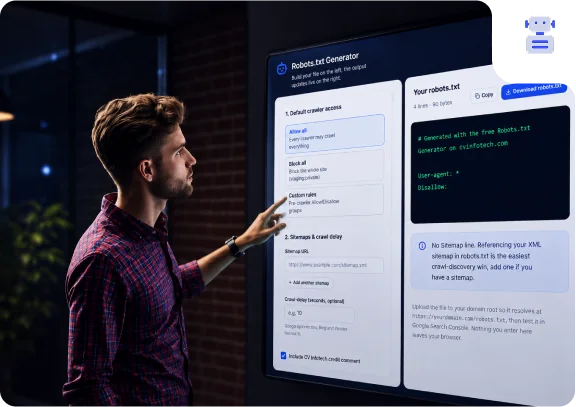
Robots.txt Generator
Build your file on the left, the output updates live on the right.
Everything runs in your browser. We do not store, transmit, or see the rules you enter. Refreshing or closing the page clears them.
2. Sitemaps & crawl delay
Google ignores this; Bing and Yandex honour it.
Your robots.txt
4 lines · 94 bytes
# Generated with the free Robots.txt Generator on www.cvinfotech.com

User-agent: *
Disallow:
No Sitemap line. Referencing your XML sitemap in robots.txt is the easiest crawl-discovery win, add one if you have a sitemap.
Upload the file to your domain root so it resolves at https://yourdomain.com/robots.txt, then test it in Google Search Console. Nothing you enter here leaves your browser.
Features
Everything you need for a correct robots.txt
Every capability below is fully functional, free, and available without an account. The tool follows the same robots exclusion protocol rules that Google, Bing, and modern AI crawlers actually implement.
Unlimited User-Agent Groups
Create separate rule groups for Googlebot, Bingbot, AI crawlers, or any custom bot, each with its own Allow and Disallow rules, exactly as the protocol intends.
AI Crawler Presets
One-click presets for GPTBot, ClaudeBot, PerplexityBot, Google-Extended, CCBot, anthropic-ai, and OAI-SearchBot, control how AI systems use your content.
Common Path Presets
Insert typical disallow rules, /admin, /cart, /checkout, /wp-admin/, /*?*, /search, /tag/, with one click, so sensible defaults take seconds, not research.
Live Output Preview
The robots.txt output rebuilds on every change in a clean monospace panel with live line count and byte size, what you see is exactly what you download.
Mistake Warnings
The tool flags dangerous patterns as you type: a full-site block under User-agent: *, rules that look like they block CSS/JS, duplicate groups, and a missing sitemap.
Sitemap Directives
Add one or more Sitemap: lines with URL validation, so every crawler that reads your robots.txt is pointed straight at your XML sitemap.
Crawl-Delay Control
Set an optional crawl delay for bots that honour it, with an honest note that Google ignores this directive, so you are never misled.
Copy or Download Instantly
Copy the finished file to your clipboard or download it as robots.txt, correctly named and typed, ready to upload to your site root.
Benefits
Why a well-built robots.txt matters for SEO
Protect your crawl budget
Search engines allocate a finite crawl budget per site. Keeping crawlers out of infinite URL spaces, faceted filters, internal search, calendar pages, leaves more budget for pages that should rank.
Keep low-value pages out of the crawl
Cart, checkout, admin, and thank-you pages add nothing to your search presence. Disallowing them keeps crawl activity focused on content that earns traffic.
Point every crawler at your sitemap
The Sitemap: line in robots.txt is the one place every crawler looks first. Referencing your XML sitemap there speeds up discovery of new and updated pages.
Decide how AI crawlers use your content
GPTBot, ClaudeBot, PerplexityBot, and Google-Extended each respect robots.txt. Whether you welcome AI training and answer engines or opt out, the choice should be yours, deliberately.
Avoid accidental catastrophes
A stray Disallow: / left over from staging can wipe a site out of search for weeks. Building the file in a tool that warns about exactly that pattern is cheap insurance.
Free, private, and instant
No account, no upload, no server round-trips. The file is built in your browser as you type, and you leave with a correct, valid robots.txt in under a minute.
About This Tool
What is robots.txt, and why generate it with a tool?
robots.txt is the first file a search engine requests from your site. It lives at your domain root and tells crawlers, Googlebot, Bingbot, and increasingly AI crawlers like GPTBot and ClaudeBot, which paths they may crawl, which they should skip, and where your XML sitemap lives. The syntax looks trivial: a few User-agent, Allow, and Disallow lines. But the rules of interpretation are not. Crawlers follow only the most specific matching group, the longest matching rule wins conflicts, and one character in the wrong place can quietly block your entire site from search.
That is why hand-typing robots.txt is riskier than it looks. The classic failure is a leftover Disallow: / from a staging server reaching production, traffic then decays for weeks before anyone notices. Other common mistakes are subtler: blocking CSS and JavaScript folders (which breaks Google's page rendering), using Disallow to try to de-index a page (it does the opposite), or duplicating user-agent groups so crawlers pick one and ignore the rest. This generator builds the file interactively, validates sitemap URLs, and warns about each of those patterns live, before you download anything.
The tool was built by the SEO team at CV Infotech, the same people who configure crawl rules for client sites in WordPress, Shopify, and custom builds every week, using the React and TypeScript stack our web development team ships to clients. It is free, requires no account, and nothing you type is sent to any server. If your crawl problems go deeper than one file, index bloat, crawl budget waste, or a migration gone wrong, that is work we do for clients every day.
Step-by-Step Guide
How to generate your robots.txt in five steps
Choose a default access preset
Start from 'Allow all', 'Block all', or 'Custom'. Most public sites start from Allow all and add targeted Disallow rules for paths that should stay out of the crawl.
Add user-agent groups and rules
Keep the * group for all crawlers, or add groups for specific bots, including AI crawlers, and give each its own Allow and Disallow paths. Use the one-click path presets for common rules.
Add your sitemap URL
Paste the full absolute URL of your XML sitemap (or several). This is the single most valuable line in the file for search visibility.
Review the live output and warnings
Check the generated file in the output panel. Resolve any warnings, especially a full-site block, before you ship it.
Upload to your site root and test
Download robots.txt, upload it to your domain root so it resolves at /robots.txt, then verify it in Google Search Console's robots.txt report before considering the job done.
Use Cases
Who needs a robots.txt generator?
WordPress & WooCommerce Sites
Keep /wp-admin/ out of the crawl (while allowing admin-ajax.php), block internal search and tag archives, and point crawlers at the sitemap your SEO plugin generates.
Shopify Stores
Supplement Shopify's default robots handling, decide policy for AI crawlers, and document sitemap locations for additional storefront domains.
Staging vs Production
Generate a strict Block-all file for staging environments and a clean production file, and never again ship the staging file to production by accident.
Large eCommerce Catalogues
Faceted navigation can generate millions of parameter URLs. Disallowing /*?* patterns and filter paths protects crawl budget for category and product pages that actually rank.
Controlling AI Crawler Access
Publishers and businesses deciding whether GPTBot, ClaudeBot, or Perplexity may use their content can express that policy in one place, per crawler, in minutes.
Agencies Managing Client Sites
Produce a correct, documented robots.txt for every client launch or migration checklist item, consistent, reviewable, and free of hand-typed syntax errors.
Best Practices
Robots.txt best practices that protect your rankings
One robots.txt, at the domain root
Crawlers only request /robots.txt from the root of each host. One file per subdomain, always at the root, always plain text encoded as UTF-8.
Always reference your XML sitemap
Add a Sitemap: line with the absolute URL. It is the cheapest crawl-discovery win available and works for every search engine at once.
Never block CSS and JavaScript
Google renders your pages. If it cannot fetch assets, it cannot evaluate the page properly, mobile-friendliness and rankings suffer. Leave asset folders crawlable.
Use noindex for de-indexing, not Disallow
Disallow stops crawling; it does not remove pages from results. To de-index, allow the crawl and add a noindex meta tag or X-Robots-Tag header.
Test before and after deploying
Run the file through Google Search Console's robots.txt report. One character in the wrong place can block your whole site, verify, do not assume.
Keep it minimal
Every rule is a chance to make a mistake. Block what genuinely needs blocking, reference the sitemap, and stop. Short files are correct files.
Watch Out
Common robots.txt mistakes to avoid
Disallow: / left over from staging
The classic site-killer: the pre-launch block-all file goes live with the site. Traffic drops to zero over days. This tool shows a prominent warning whenever a full-site block is present under User-agent: *.
Blocking CSS and JS folders
Breaks Google's page rendering, so it cannot see your site the way users do. An old habit from the 2000s that now actively hurts rankings.
Assuming Disallow removes pages from Google
It does not, it only stops crawling. Disallowed pages can still be indexed from external links, and Google can never see a noindex tag on a page it is not allowed to fetch.
Wrong file location
A robots.txt in /blog/robots.txt or a subfolder does nothing. It must be at the domain root, one file per subdomain and protocol.
Using robots.txt to hide private data
robots.txt is public, anyone can read it, and listing /secret-admin/ in it is literally a signpost. Sensitive areas need authentication, not a crawl directive.
Conflicting rules across groups
Crawlers follow only the most specific matching user-agent group, a Googlebot group completely replaces the * group for Googlebot; the two are not merged. Duplicate groups for the same agent make behaviour unpredictable.
FAQ
Robots.txt generator, frequently asked questions
robots.txt is a plain-text file that tells search engine crawlers which parts of your website they may or may not crawl. It uses simple directives, User-agent, Allow, Disallow, Crawl-delay, and Sitemap, grouped by crawler. It is a crawl directive, not a security mechanism: well-behaved bots follow it, but it does not password-protect anything.
No. The generator runs entirely in your browser. Nothing you enter is sent to or stored on our servers. We do use anonymous visit analytics to understand how the tool is used, but that never includes the rules you type.
At the root of your domain, so it is reachable at https://www.example.com/robots.txt. A robots.txt file in a subfolder is ignored, crawlers only ever request it from the domain root. Each subdomain (and each protocol) needs its own file.
Strictly, no, if the file is missing, crawlers assume they may crawl everything. But having one is best practice: it lets you point crawlers at your XML sitemap, keep low-value pages (cart, search results, admin paths) out of the crawl, and manage AI crawler access. For anything beyond a tiny brochure site, you should have one.
No, and this is the most common misconception. Disallow stops crawling, not indexing. A disallowed URL can still appear in results (usually without a description) if other sites link to it. To keep a page out of Google, use a noindex meta tag or proper authentication, and note the page must be crawlable for Google to see the noindex tag.
Disallow (robots.txt) tells crawlers not to fetch a URL. noindex (a meta tag or X-Robots-Tag header) tells search engines not to show the page in results after crawling it. To de-index a page, use noindex and let it be crawled. Disallowing a page you want de-indexed is counterproductive, Google can never see the noindex instruction.
Create a group starting with User-agent: Googlebot and add your Allow or Disallow rules under it. Crawlers follow the most specific group that matches them, so a Googlebot group overrides a * group entirely for Googlebot. This generator lets you add any number of user-agent groups with their own rules.
Add a group for each AI crawler with Disallow: / under it. Common AI user agents include GPTBot (OpenAI), ClaudeBot and anthropic-ai (Anthropic), PerplexityBot, Google-Extended (Gemini training), CCBot (Common Crawl), and OAI-SearchBot. All are available as one-click presets in this generator. Blocking Google-Extended does not affect your normal Google Search rankings.
No. Google renders pages like a browser, and if it cannot fetch your CSS and JS it may misjudge mobile-friendliness, layout, and content, hurting rankings. Blocking /wp-includes/ or asset folders was an old practice that now does more harm than good. This tool warns you if a rule looks like it blocks CSS or JS.
Yes. Add one Sitemap: line per sitemap, each with a full absolute URL. This is common for large sites that split sitemaps by section (pages, posts, products) or use a sitemap index file. Sitemap lines are independent of user-agent groups and can appear anywhere in the file.
Crawl-delay asks crawlers to wait a number of seconds between requests. Bing, Yandex, and some others respect it; Google ignores it entirely, you manage Google's crawl rate in Search Console instead. Only set a crawl delay if a specific non-Google bot is genuinely overloading your server.
Use a Disallow for the folder and a more specific Allow for the file, in the same group: Disallow: /private/ plus Allow: /private/public-file.html. When rules conflict, Google follows the most specific (longest) matching rule, so the Allow wins for that one file.
The simplest valid file is User-agent: * followed by Disallow: with nothing after the colon, an empty Disallow means nothing is blocked. This generator's 'Allow all' preset produces exactly that, and it is a perfectly good robots.txt for most small sites, ideally with a Sitemap line added.
Use the robots.txt report in Google Search Console (Settings > robots.txt), it shows the fetched file, parse errors, and lets you check specific URLs. Test after every change: a single mistyped Disallow: / can de-facto remove your site from search. This generator also warns you live about the most dangerous patterns.
WordPress serves a minimal virtual robots.txt if no physical file exists, and SEO plugins like Yoast or Rank Math let you edit it. A physical file at the domain root always takes precedence over the virtual one. If you generate a file here, upload it via FTP or your host's file manager to the site root.
Yes, for the major engines. * matches any sequence of characters (Disallow: /*?* blocks every URL containing a query string) and $ anchors the end of a URL (Disallow: /*.pdf$ blocks all PDFs). Google, Bing, and most modern crawlers support both, though the original 1994 standard did not, very old bots may ignore them.
More Free Tools
Related tools from CV Infotech
Free Invoice Generator
Create professional, tax-compliant invoices with your logo and download a print-ready PDF, free, no sign-up.
Try it freeXML Sitemap Generator
Build a spec-valid sitemap.xml from your URL list with per-URL priority, changefreq, and lastmod.
Try it freeWeb Development Cost Estimator
AI-powered estimate for your website or web app project in under two minutes.
Try it freeExplore CV Infotech services
The team behind this tool builds websites, web apps, SaaS products, and AI solutions for clients in the USA, UK, Australia, and Canada.
Why CV Infotech
Need more than a robots.txt file?
This tool is genuinely free, no sign-up, no catch. But if your search visibility problems go deeper than crawl rules, technical SEO audits, site migrations, index bloat, or a site that simply does not rank, that is exactly what our team does. CV Infotech has been shipping software and SEO results since 2012, 14+ years and 12,000+ projects delivered for clients across the USA, UK, Australia, and Canada.
5.0 on Clutch
35 reviews
4.4 on Trustpilot
12 reviews
5.0 on Freelancer
512 reviews