Free Business Tool by CV Infotech
Free OnlineInvoice GeneratorNo Sign-Up Needed
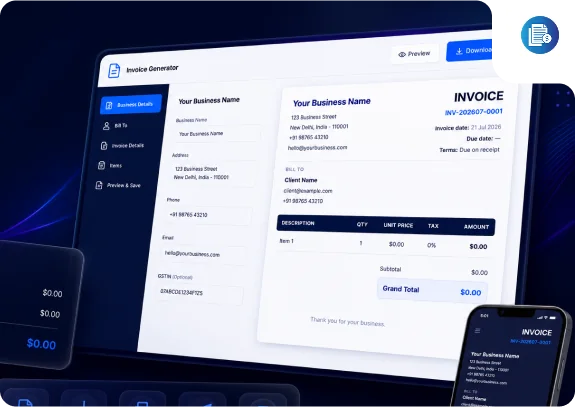
Create professional, tax-compliant invoices in minutes, add your logo, bill in six currencies, apply GST/VAT and discounts per item, and download a print-quality PDF. Everything runs in your browser, so your data stays yours.
- Unlimited invoices, line items & currencies
- Live preview with instant PDF download
- Your data never leaves your browser
- Forever
- Free
- Registration
- Zero
- PDF Export
- Instant
- Currencies
- 6
Create Your Invoice
Your invoice data never leaves your browser. We do not store, transmit, or see any of the information you enter. Refreshing or closing the page clears it permanently.
Your Business Details
Company Logo (JPG/PNG/SVG, max 2MB)
Optional, shown on the invoice for tax compliance.
Client Details
Invoice Details
Line Items
Item 1
Row total: $0.00
Additional Information
Features
Everything you need to invoice like a professional
This is not a stripped-down demo with a paywall behind it. Every capability below is fully functional, free, and available without an account, the same standard we hold our client work to.
Multi-Currency Support
Bill in USD, GBP, EUR, AUD, CAD, or INR with the correct symbol and locale-aware number formatting applied automatically to every amount on the invoice.
Per-Item Tax & Discounts
Set a tax percentage and a discount, percentage or flat amount, on each line item independently. Discounts apply before tax, the standard for GST and VAT.
Live Invoice Preview
Every keystroke updates a pixel-accurate preview of the final invoice, so there are no surprises between what you type and what your client receives.
PDF Download & Print
Export a print-quality A4 PDF named after your invoice number, or print directly from the browser with a clean, invoice-only layout.
Your Logo, Your Brand
Upload a JPG, PNG, or SVG logo up to 2MB. It is processed entirely in your browser and rendered on both the preview and the exported PDF.
Unlimited Line Items
Add as many rows as the job needs, delete ones you do not, and reorder them with keyboard-accessible controls. Totals recalculate instantly.
Light & Dark Mode
Work in whichever theme suits you. The exported PDF and printed invoice always render in a clean light layout regardless of your screen theme.
100% Private, In-Browser
No accounts, no uploads, no stored invoice data. Your business and client details never leave your device, close the tab and they are gone.
Benefits
Why thousands of businesses use an online invoice generator
Save time on every invoice
Stop rebuilding the same document in a word processor. Enter your details once per invoice, and the layout, numbering, and totals are handled for you in minutes.
Eliminate calculation errors
Manual spreadsheets are where tax mistakes live. Subtotals, discounts, tax, and the grand total are computed live to two decimals, never a wrong sum, never NaN.
Get paid faster
Invoices with clear numbers, due dates, itemised charges, and payment terms get processed faster by clients and their accounts teams. This tool makes all of that the default.
Look professional
A clean, branded invoice with your logo signals that you run a serious operation, which matters when you are a freelancer or small agency competing for repeat work.
Nothing to install
No software download, no browser extension, no account. It works in any modern browser on any device, from a phone at a client site to your desktop.
Free and genuinely private
The tool is free with no upsell wall, and your data stays in your browser. We do not see, store, or transmit anything you type.
About This Tool
What is an invoice generator, and why use this one?
An invoice generator is a tool that turns your billing details, who you are, who you are billing, what you delivered, and what it costs, into a formatted, professional invoice document you can send to a client. It replaces manually laying out invoices in Word or Excel, where formatting drifts, totals get miscalculated, and tax lines are easy to get wrong. Freelancers, agencies, consultants, and small businesses use invoice generators to produce consistent paperwork without paying for full accounting software.
A compliant invoice needs specific elements: a unique sequential invoice number, the issue date and due date, the legal names and addresses of both parties, an itemised list of goods or services with quantities and unit prices, applicable tax (GST, VAT, or sales tax) shown separately, the total amount due, and your payment terms. Miss one of these and you risk payment delays or problems at tax time. This generator puts every one of those fields in front of you so nothing gets forgotten.
What makes this tool different is where your data lives: nowhere but your browser. Most free invoice tools are lead traps, they require an account, store your client data on their servers, watermark the output, or lock PDF export behind a subscription. This one does none of that. It was built by the web development team at CV Infotech using the same React and TypeScript stack we ship to clients, and it is free because it is useful, the same reason we publish our project cost estimators. If you eventually outgrow manual invoicing and need automated billing, recurring invoices, or a client portal, that is custom software we build , but the tool itself will never ask you for money or an email address.
Step-by-Step Guide
How to create an invoice in five steps
Enter your business details
Add your company name, address, contact details, and GST/VAT number, and upload your logo. These appear in the invoice header and identify you as the seller.
Add your client's details
Fill in the client's name, company, address, and contact information so the invoice clearly states who is being billed.
Add line items
List each product or service with a description, quantity, and unit price. Apply per-item tax and discounts, the totals update live as you type.
Set currency, dates, and terms
Pick from six currencies, set the invoice and due dates, and state your payment terms so clients know exactly how and when to pay.
Download or print your invoice
Review the live preview, then download a pixel-perfect A4 PDF or print it directly. The file is named after your invoice number for easy filing.
Business Use Cases
Who this invoice generator is built for
We work with freelancers, agencies, and product companies across the USA, UK, Australia, and Canada every day, this tool covers the invoicing situations we see most often.
Freelancers
Designers, developers, writers, and consultants who need a professional invoice for each project without paying for accounting software they barely use.
Agencies & Studios
Small agencies invoicing retainers and project milestones across multiple clients and currencies, with per-item tax handling for domestic and overseas work.
eCommerce Sellers
Store owners issuing GST or VAT-compliant invoices for wholesale orders, B2B customers, or marketplace transactions that need formal paperwork.
Consultants
Independent specialists billing by the hour or by deliverable, who need itemised descriptions and clear payment terms their clients' finance teams accept without questions.
SaaS Founders
Early-stage founders invoicing pilot customers and annual contracts manually before subscription billing is automated, professional paperwork from day one.
Cross-Border Businesses
Indian, UK, or European businesses billing clients in the USA, UK, Australia, and Canada, with the right currency, formatting, and tax fields for each market.
Invoice Best Practices
Five habits that get invoices paid on time
Use clear, sequential invoice numbers
Unique, sequential numbering (like INV-202607-0001) is a legal requirement in most jurisdictions and the first thing an accounts team checks. Never reuse or skip numbers, and keep one series per financial year if that is your local convention.
Always state a due date and payment terms
"Net 15" or "Due on receipt" removes ambiguity and gives you a concrete date to follow up on. Invoices without a due date get paid whenever the client feels like it.
Itemise your descriptions
"Website redesign, homepage, 3 inner templates, responsive build" gets approved faster than "Design work". Specific descriptions prevent disputes and speed up sign-off.
Handle GST, VAT, and sales tax correctly
Apply the right rate per item, show the tax amount separately from the subtotal, and include your GST/VAT registration number. Cross-border services often have different rules, when in doubt, confirm with your accountant.
Follow up on overdue invoices promptly
Send a polite reminder the day after the due date, not three weeks later. Consistent, early follow-up is the single biggest factor in getting paid on time.
Common Mistakes
Invoicing mistakes that delay your payments
Missing or duplicate invoice numbers
Breaks your audit trail and can invalidate the invoice for tax purposes. Let the generator's sequential numbering do the work.
No due date
An invoice without a due date is a suggestion, not a demand. Always set one, even if it is simply the invoice date for "due on receipt" billing.
Wrong or missing tax
Charging the wrong GST/VAT rate, or forgetting tax entirely, means correction invoices, awkward emails, and possible penalties. Set the rate per line item.
Vague line descriptions
"Services rendered" invites questions and delays. Say what was delivered, in what quantity, at what rate.
No payment terms or bank details
If the client has to email you asking how to pay, you have added days to your payment cycle. State terms and payment instructions on every invoice.
Not keeping copies
This tool stores nothing by design, so download the PDF and file it. You will need it at tax time, and clients occasionally ask for reissues.
FAQ
Invoice generator, frequently asked questions
Yes. The invoice generator is completely free with no hidden charges, no trial periods, and no premium tiers. You can create and download as many invoices as you need. We built it as a genuinely useful free tool for the freelancers and small businesses we work with every day.
No. There is no sign-up, no email capture, and no account required. Open the page, fill in your details, and download your invoice. Nothing is stored on our servers.
Everything you type runs entirely in your browser. Your business details, client information, and line items never leave your device, your invoice data is never sent to our servers, saved in a database, or tracked in any way. When you close the tab, the data is gone, so download your PDF before leaving the page. Like the rest of our site, the page itself uses anonymous analytics to measure visits, but that never includes anything you enter into the tool.
Nowhere on our servers. The Invoice Generator runs entirely in your browser. Your business details, client details, and line items are held only in your browser's memory while you use the tool and are erased when you refresh or close the tab. We never receive, store, or have access to this data.
Yes. Upload a JPG, PNG, or SVG logo up to 2MB and it appears on the invoice preview and in the downloaded PDF. The logo is processed locally in your browser and is never uploaded anywhere.
The generator supports USD, GBP, EUR, AUD, CAD, and INR with the correct currency symbol and locale-aware number formatting for each. This covers billing clients in the USA, UK, Europe, Australia, Canada, and India.
Yes. Each line item has its own tax percentage field, so you can apply GST, VAT, or sales tax per item at whatever rate applies. There is also a dedicated GST/VAT number field in the business details section for compliant invoicing.
Yes. Click Download PDF and the tool generates a print-quality A4 PDF that matches the on-screen preview exactly, named after your invoice number, for example invoice-INV-202607-0001.pdf.
Yes. The tool auto-generates a sequential invoice number in the format INV-YYYYMM-0001, but the field is fully editable so you can match your own numbering scheme. Consistent, unique invoice numbers are a legal requirement in most jurisdictions, so keep them sequential.
Yes, there is no limit on line items. Each row has its own description, quantity, unit price, discount, and tax rate, with an auto-calculated row total. You can add, delete, and reorder rows at any time.
Yes. Each line item supports a discount, either a percentage or a flat amount, and a tax percentage together. The discount is applied first, then tax is calculated on the discounted amount, which is the standard approach for GST, VAT, and sales tax.
Yes. The Print Invoice button opens your browser's print dialog with a print stylesheet that isolates the invoice, so the printed page contains only the invoice itself, no navigation, buttons, or page sections.
Yes. The PDF is generated directly from the live preview at high resolution, so fonts, spacing, totals, and your logo appear exactly as you see them on screen. The invoice always exports in a clean light layout even if you are using dark mode.
The tool does not store data between sessions by design, so for a recurring invoice simply keep your previous PDF as a reference, and the invoice number auto-increments in a predictable format. If you invoice the same clients every month and want automation, that is a custom billing system, something our development team builds.
Yes. The tool is fully responsive from 320px phones up to large desktops. On mobile the form and preview stack vertically with a quick toggle to jump between editing and previewing your invoice.
Yes. With six currencies, locale-correct formatting, a GST/VAT field, and free-text payment terms, the generator handles cross-border invoicing, for example an Indian agency billing a US client in USD, or a UK freelancer billing an Australian client in AUD.
More Free Tools
Related tools from CV Infotech
Robots.txt Generator
Build a correct robots.txt with per-crawler rules, AI bot presets, and live mistake warnings.
Try it freeXML Sitemap Generator
Create a spec-valid sitemap.xml with bulk URL paste, validation, and instant download.
Try it freeWeb Development Cost Estimator
AI-powered estimate for your website or web app project in under two minutes.
Try it freeExplore CV Infotech services
The team behind this tool builds websites, web apps, SaaS products, and AI solutions for clients in the USA, UK, Australia, and Canada.
Why CV Infotech
Need more than an invoice template?
This tool is genuinely free, no sign-up, no catch. But if your business has outgrown manual invoicing and needs custom billing software, a client portal, automated recurring invoices, or payment integration, that is exactly what our development team builds. CV Infotech has been shipping software since 2012, 14+ years and 12,000+ projects delivered for clients across the USA, UK, Australia, and Canada.
5.0 on Clutch
35 reviews
4.4 on Trustpilot
12 reviews
5.0 on Freelancer
512 reviews