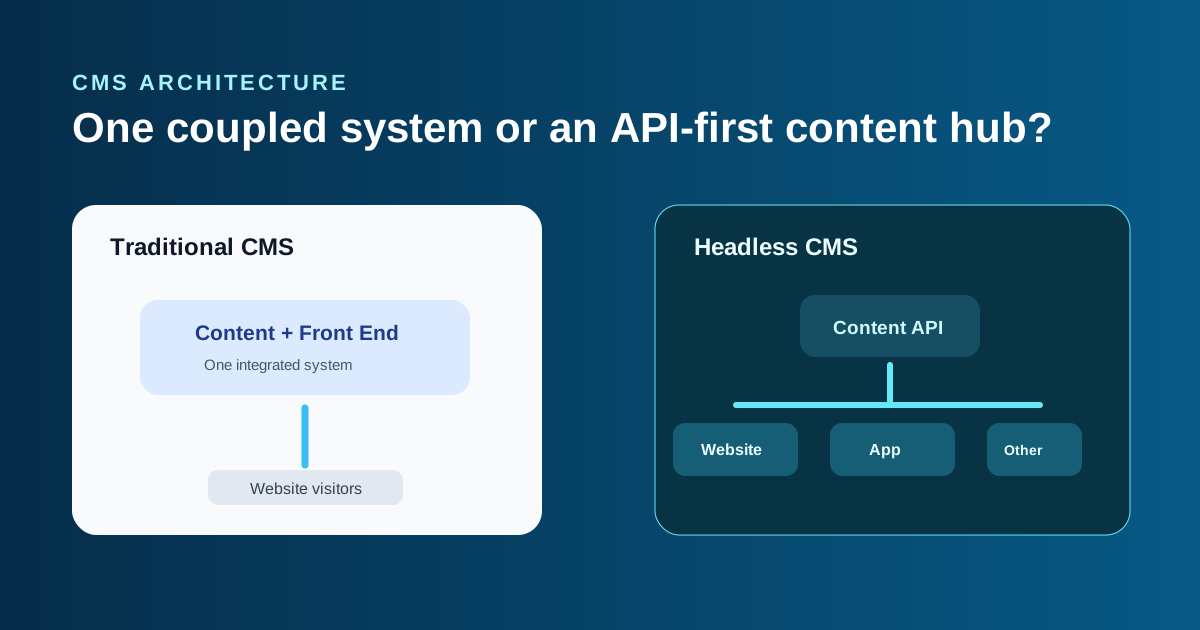
“Should we go headless?” is one of those questions that often arrives before a team has agreed on the problem it is trying to solve. Headless architecture can be excellent. It can also add a front end, an API, and ongoing developer dependency to a project that never needed them.
The Architecture Difference in Plain English
Traditional CMS
The content dashboard and the website front end are coupled. Editors change content in one system and the system renders the pages visitors see.
Headless CMS
The CMS stores content only. A separate front-end app requests that content through an API and decides how to display it.
Storyblok’s comparison of headless and traditional CMS describes the same core trade-off: flexibility and multi-channel delivery in return for a more technical setup.
Where a Traditional CMS Usually Wins
For a straightforward business site, marketing site, or editorial blog, a traditional CMS is often the most sensible solution. It puts content management and publishing in one place, lets non-technical people make routine edits, and usually costs less to build and maintain.
That does not make it outdated. WordPress, Shopify, and many other traditional platforms can still be fast, well-designed, secure, and SEO-friendly when configured and maintained properly. The important question is whether you have an actual need to distribute the same content to more than one destination.
Where a Headless CMS Earns Its Extra Complexity
Headless makes sense when content needs to serve a website, mobile app, in-store screen, partner portal, or several brand experiences from one source of truth. It also gives the development team freedom to choose a front-end framework built around a demanding performance or product requirement.
Platforms such as Contentful explain the API-first model of a headless CMS well. The benefit is not that content becomes “more modern.” It is that the same structured content can travel to different products without being copied and maintained separately.
Working on a CMS architecture project?
Written scope before billing. $30/hr. We tell you if we're not the right fit.
The Cost Reality: You Are Building Two Systems
A headless project usually has two moving parts: the content platform and the custom front end. That means you must build, host, test, and maintain both. The freedom is real, but so is the ongoing development responsibility.
SEO is a useful example. A traditional CMS may provide metadata, sitemaps, and structured-data tools in its normal workflow. A headless CMS does not render pages itself, so the front-end team must implement those concerns correctly. That is perfectly manageable for the right team, but it is not free.
How to Decide Without Following a Trend
- List every channel that truly needs the same content today or in the next 12 to 18 months.
- Identify whether a standard CMS blocks a specific performance, design, or integration need.
- Decide who will own front-end maintenance after launch.
- Compare the cost of two systems against the operational benefit you will actually use.
If the answer is one website with a normal editorial workflow, traditional is likely the better fit. If the answer is a shared content hub powering multiple digital products, headless may justify the investment.

Akash Singh
View full profileCTO and Co-Founder, CV Infotech · Gurugram, India
Akash has been building Websites, Web Apps, SaaS and Mobile Apps for clients in the USA, Europe, Australia, and Canada since 2012. He leads a 100% in-house team and personally manages every client relationship and technical decision. Francisco Escobar has worked with him since 2012. Steven has trusted the team with his AI platforms since 2019. 512 verified 5.0 reviews on Freelancer.com.